Your coding agent lives in a terminal. Give it an editor.
You already pay for an AI coding plan that runs as a command-line tool — no file tree, no editor, no diff to review before it changes your code. Catalase wraps it in a real window and drives it with the plan and login you already have. No second subscription.
- Keep the plan you pay for
- Or run models free on your machine
- No compulsory login, no telemetry
v0.0.6-alpha.2 · Apache-2.0 · macOS not available yet · The installer isn't code-signed, so Windows will ask you to confirm. Here's what to click.
Explorer
Source control
app.py
3 passed in 0.41s
$ _
Chat · Agent
It drives the tool you already installed
No reverse engineering, no credential handling, no second bill. Catalase runs the vendor's own command-line tool as a subprocess and renders what comes back.
You install the vendor's CLI
The same one you would run in a terminal. Catalase checks whether it is on your machine and tells you if it isn't.
You sign in to it yourself
In your own terminal, with the vendor's own login. No credential passes through Catalase, and none is stored by it.
Catalase pipes a prompt in
It starts the CLI as a subprocess, sends your prompt, and streams the response back into the editor.
You get an editor around it
File tree, Monaco editor, a real terminal, a git panel with diffs, and every proposed change shown as a card you approve or undo.
What this does and does not claim. Catalase does not reimplement, proxy or impersonate any vendor's sign-in. It launches a program you installed, under the session you created. Whether driving a given plan from a third-party tool is permitted is between you and that vendor — check your plan's terms. Catalase deliberately took this route instead of reimplementing vendor logins, which it treats as off limits.
Works with the plans you already pay for
 Claude Code
 GitHub Copilot
 OpenAI Codex
 Gemini CLI
 Antigravity CLI
 Qwen Code
 Amazon Q Developer
 opencode
 Kilo Code
 GLM Coding Plan
Product names and marks belong to their owners; their appearance here indicates compatibility, not endorsement, affiliation or partnership.
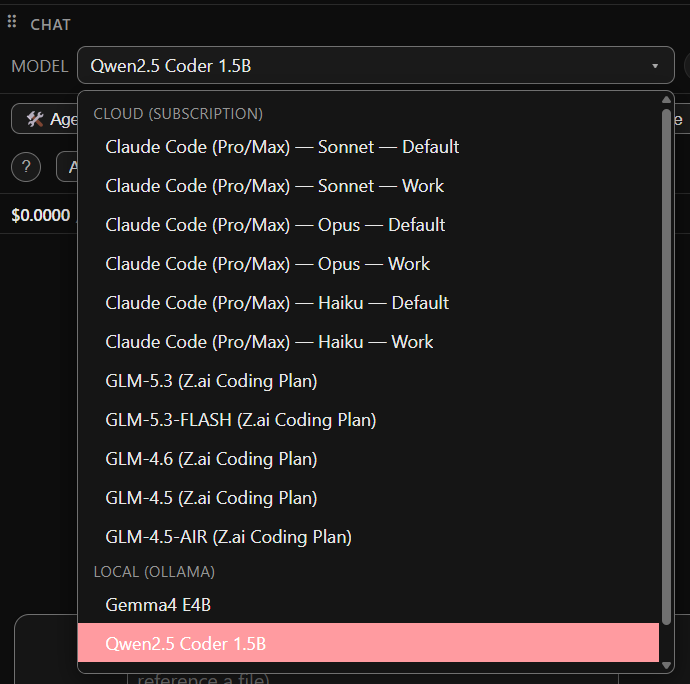
Switch plan, account and model mid-conversation
Most tools tie you to one provider. Catalase lists everything you can actually use right now in a single grouped picker — and keeps separate logins apart, so a work account and a personal account never mix.
Grouped by what's ready
Plans you are signed in to, local models you have pulled, and providers with a saved key sit at the top. Anything needing setup is collapsed below, greyed out, with a link straight to Settings.
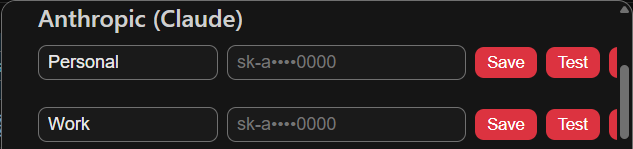
Separate accounts stay separate
Give each login a name — Work, Personal — and each gets its own isolated credential store. The picker shows them as distinct entries rather than collapsing onto whichever signed in last.
A different model per task
Point chat, commit messages, PR descriptions, diff explanations and code review at different models independently. Set it once in Settings → Model routing.
Switch from the keyboard
Type /model in chat to list everything, or name one directly. An ambiguous name lists the candidates instead of guessing.
Run models on your own machine, free
If you would rather not use a paid plan — or you want a free fallback when one runs out — Catalase runs models locally through Ollama. A turn on a local model costs nothing and needs no network. Install Ollama, open the Marketplace, and Catalase does the matching; nothing here needs a terminal.
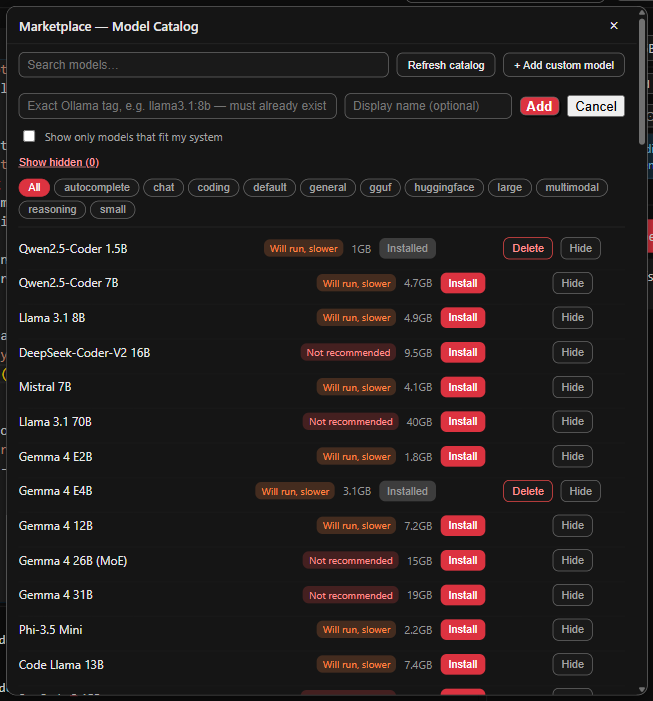
Hardware-fit Marketplace
Every model shows whether it will run well on your system, how large it is, and Install or Delete. "Not recommended" means your total RAM is below the model's minimum; "Will run, slower" means it fits but memory is tight right now.
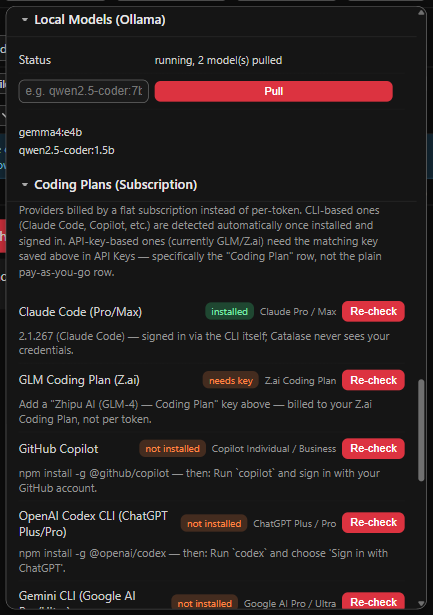
Install without leaving the app
Pull an Ollama model by name in Settings → Local Models, or install from the Marketplace. Catalase lists what you already have.
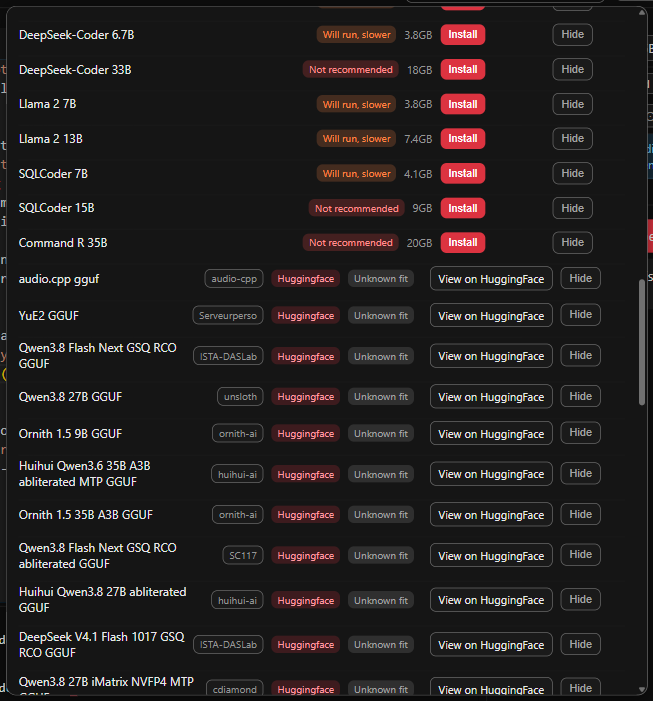
A catalogue that stays fresh
Catalase discovers GGUF models on Hugging Face alongside a curated list, with no duplicates. Each row shows who published it and its quantization, so same-named models are easy to tell apart.
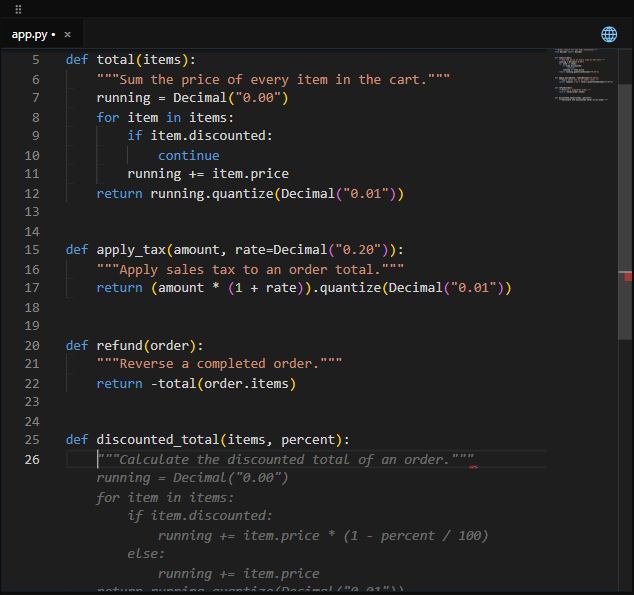
Suggestions as you type
Turn on Inline suggestions and a local model writes grey ghost text as you type. Tab accepts, Esc dismisses, Alt+] and Alt+[ step through alternatives.
By design: inline completion has no cloud network client at all — not as a setting, but structurally.
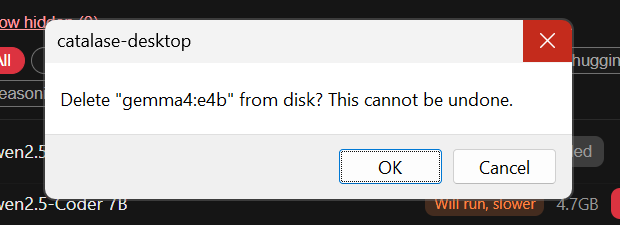
Clean up, with a safety net
Delete an installed model from the Marketplace to free the disk space. Catalase asks first, and cancelling removes nothing.
Suggestions fail quietly
Inline suggestions fire on every typing pause, so an error dialog per keystroke would be worse than nothing. If nothing appears, check Ollama is running and the model is pulled.
Local by default. Cloud when it earns its place.
Use a small local model for commit messages and explanations, and a stronger cloud model for code review. Set it per task, once.
Local
Ollama models on your machine. Autocomplete and offline chat run against it on localhost.
API keys
Anthropic, OpenAI, Google, Zhipu and OpenRouter. Test verifies a key against the real API before you rely on it. Keys are encrypted at rest with your OS keychain and never written to a config file.
Subscriptions you already pay for
Claude Pro/Max, GitHub Copilot, ChatGPT Plus/Pro, Google AI Pro/Ultra, Alibaba Coding Plan, Amazon Q Developer and opencode. Install the vendor's CLI and sign in to it yourself — no credential passes through Catalase.
Choose a model for each job
Settings → Model routing. Leave any on "Use default".
| Task | Example choice |
|---|---|
| Chat | Local model |
| Commit messages | Small, fast local model |
| PR title, body, changelog | Use default |
| Explain diff | Local model |
| Code review | Stronger cloud model |
Example choices are illustrations; you pick the models.
Cursor and Windsurf aren't listed, on purpose. Their subscriptions are tied to their own editors, with no CLI a third-party tool can drive. Listing them would promise access that doesn't work.
Switch from the keyboard. Type /model in chat to list everything, or name one directly. An ambiguous name lists the candidates instead of guessing.
Subscription turns read $0.00 (subscription) in the cost meter. That isn't a claim the usage is free — billing happens on the vendor's side, so Catalase has no basis to meter it.
You decide what leaves your machine, and what it costs
Privacy mode
Settings → Privacy forces every request to a local model. It is enforced on the server side, not just in the UI, so a modified client can't bypass it.
A cost meter and a session cap
The meter is always visible and updates after every response. At 80% of your cap you get a warning; at 100% Catalase switches to a local model rather than continuing to spend. Turns on a local model cost $0.0000.
No account, ever
There is no login anywhere in the product and no Catalase-run account system. Nothing is required to use it.
Zero telemetry
Catalase collects no usage analytics. The error log stays on your machine and documents itself as not telemetry.
Your keys stay yours
API keys are encrypted at rest with your OS keychain through Electron's safeStorage, never written to a config file. For subscriptions, you sign in to the vendor's own CLI.
Project data stays in the project
Snapshots, memory, custom commands and MCP settings live in a hidden .catalase folder inside your project.
Illustration. When you choose a cloud model, your prompt and the context you attach go to that provider.
Everything you code with, in one window
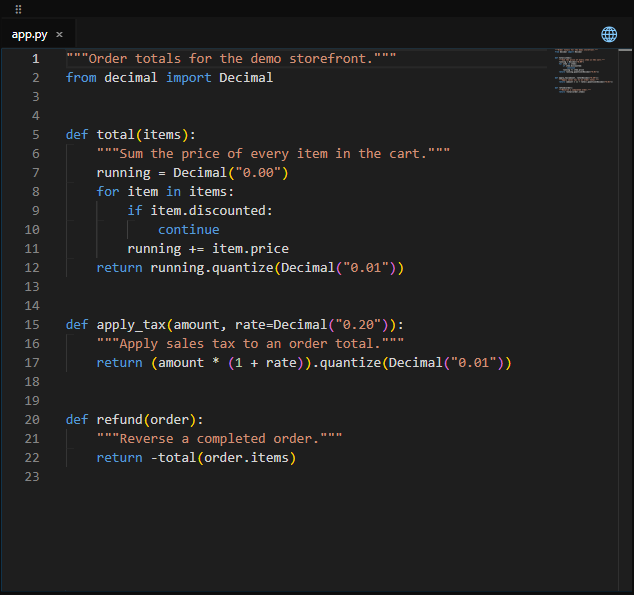
A real editor, not a chat box
Catalase is built on Monaco, the editor that powers VS Code — but Catalase is not a VS Code fork. Tabs, find and replace, go to line, and syntax highlighting for about 80 languages. Dark, Light and High Contrast themes.
For Python you also get diagnostics and go-to-definition through pyright; other languages get highlighting and AI suggestions.
Ctrl+S save · Ctrl+F find · Ctrl+G go to line · Alt+↑/↓ move line
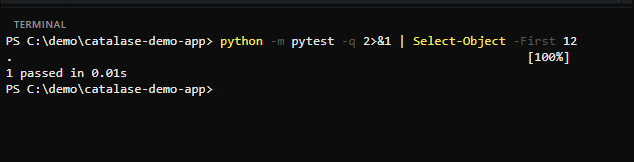
A real shell in your project
Opens in your project folder, PTY-backed. Type @terminal in chat to give the AI the recent output, for example to explain an error. If a command stops to ask for a password or y/n, a banner tells you it's waiting.
One terminal per window.
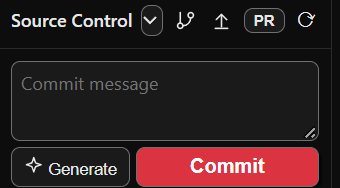
Review, commit, publish
Stage and unstage, click a file for its diff in a real Monaco diff viewer, press Explain for a plain-language summary, or Generate for an AI commit message. Catalase shells out to real git.
Push only — no pull, fetch, merge or stash yet. Create PR is GitHub-only, via the gh CLI.
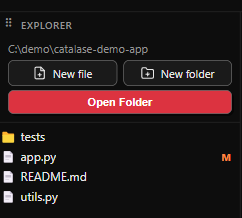
Your files, not ours
Create, rename and delete from the right-click menu, with git state beside each file. Catalase indexes the project with Tree-sitter so chat can resolve file.py:42 references to real locations. Won't overwrite an existing name.
No move, copy or duplicate in the Explorer yet.
Code intelligence is Python-only · PRs are GitHub-only · no pull, fetch or merge yet · one terminal per window · no debugger
Let the agent work. Stay in charge.
Agent mode lets the model read files, write files and run commands in your project. You decide how often it has to ask, and every file write can be undone with one action — no manual git surgery.
Illustration. Start a session branch before a bigger task, so its changes are easy to review or discard.
| Mode | Behaviour | Good for |
|---|---|---|
| Manual | Every action needs approval | New to the agent, sensitive code |
| Auto | Low-risk actions run; risky ones still ask | Most day-to-day work |
| Edit Automatically | Everything runs immediately | Throwaway branches you'll review after |
| Plan | Proposes a plan; nothing runs until you approve | Larger changes |
Every action is a card
Each proposed action shows its risk level. Approve or reject it. After a file change runs, Undo on its card reverses it.
Plans open in a read-only tab
In Plan mode, read the plan first, then press Execute plan when you're happy. A finished turn retires leftover plan buttons so a plan can't be run twice.
Keep talking while it works
Press Enter while a turn is running and your message is injected into it as context. The Stop button cancels the turn surgically rather than closing the connection.
Bring your own tools (MCP)
List MCP servers in .catalase/mcp_servers.json and their tools become available to the agent. Run /mcp to check they connected.
Set up by file; no management screen yet.
30 tools that run in your browser, not on our servers
The same principle as the editor: your data stays where it is. Every tool below runs entirely in your browser — no upload, no account, no sign-up. They work with the tab offline once loaded.
Diff checker
Compare two blocks of text or code line by line and see exactly what changed.
Base64 encode / decode
Convert text and data to and from Base64, including URL-safe variants.
LLM token counter
Estimate how many tokens a prompt uses, and what it would cost per request.
Epoch converter
Turn Unix timestamps into readable dates in UTC and your local zone, and back.
Subnet calculator
Work out network and broadcast addresses, masks and usable host counts from CIDR.
Regex tester
Test a pattern against sample text with live match highlighting and capture groups.
How Catalase compares
Catalase is an editor that runs models locally and asks for no account. Here is where that helps, and where it doesn't, yet.
| Capability | Catalase | Cursor | GitHub Copilot | Zed | Continue | Cline |
|---|---|---|---|---|---|---|
| Form factor | Desktop editor | Desktop editor | Editor extension | Desktop editor | CLI + extension | Extension, CLI, app |
| Open-source client | ✓ Apache-2.0 | ✕ closed | ✕ proprietary | ✓ GPL-3.0 | ✓ Apache-2.0 | ✓ Apache-2.0 |
| Works with no account | ✓ no login at all | ✓ free tier, login optional | ✕ GitHub account | ✓ no login required | ✓ no login; repo read-only | ✓ BYO key path needs no Cline account |
| Local models | ✓ Ollama, default path | ✕ hosted only | ✕ hosted only | ✓ local models supported | ✓ via Ollama and others | ✓ Ollama, LM Studio |
| Actively maintained | ✓ | ✓ | ✓ | ✓ | ✕ repo read-only | ✓ |
| Price | Free | Free tier, then $8+/mo | Free tier, then $10+ | $0 Personal | Free (open source) | Free (open source) |
From each vendor's own documentation, November 2026; not independently tested. Cursor's pricing page is mixed with Grok/X content — see the full comparison for the caveat. Continue's repository is archived and read-only.
What Catalase doesn't do yet
Catalase v0.0.6-alpha.2 is honest about what it does not do yet.
- Alpha release — see the changelog and known limits before relying on it for critical work.
- No macOS build yet — Windows and Linux only.
- The installer isn't code-signed, so Windows SmartScreen warns on first run and Linux may warn about an unverified source.
- Code intelligence (diagnostics, go-to-definition) is Python-only.
- Git: push only. No pull, fetch, merge or stash, and Create PR works with GitHub only.
- Local inference needs Ollama installed separately.
- MCP tools are set up by file, with no management screen.
- One terminal per window, and no debugger.
- No move, copy or duplicate in the file Explorer.
- If the AI backend stops responding, restart Catalase — your files and conversations are kept.
Up and running in about three minutes
Install Ollama and pull a model
Catalase needs a local model for autocomplete and offline chat.
ollama pull qwen2.5-coder:1.5b— about 1 GB, and it runs on a laptop without a GPU.Install Catalase
Run the Windows installer, or the Linux AppImage or .deb. On Windows, if you see "Windows protected your PC", choose More info → Run anyway. The installer isn't signed yet.
Open a folder
Open Folder in the sidebar. Catalase indexes the project with Tree-sitter so chat can resolve
file.py:42references to real locations.Start typing
Ghost-text suggestions appear as you type. Tab accepts, Esc dismisses. A cloud key or subscription is optional and can wait.
That's the whole setup. Everything else is optional.
Questions people ask
Is Catalase free?
Yes, entirely, for everyone. The client code is Apache-2.0 licensed. There is no paid tier today. If Catalase ever charges, it would be for future server-side features Catalase runs — never for anything that runs locally on your machine.
Do I need an account?
No. There is no login anywhere in the product and no Catalase-run account system. Nothing is gated behind a sign-up.
Is this a VS Code fork?
No. Catalase uses Monaco, the same editor component VS Code is built on, but it is a from-scratch Electron application. It is not a fork of VS Code and does not inherit VS Code's extension platform.
What platforms does it run on?
Windows, via an installer, and Linux, as an AppImage or a .deb package. macOS is not available yet. The AppImage and the Windows installer can update themselves; a .deb cannot.
Do I need Ollama?
For local models and inline suggestions, yes — Catalase runs them against Ollama on localhost. Without Ollama you can still chat using an API key or a subscription CLI.
Is my code sent anywhere?
Only to a provider you have explicitly configured, for the specific request you made. Inline completion has no cloud network client at all. Privacy mode forces every request local and is enforced server-side. There is no telemetry.
What happens to my API keys?
They are encrypted at rest with your operating system's own keychain, through Electron's safeStorage, and never written to a config file. For subscriptions you sign in to the vendor's own CLI, and no credential passes through Catalase.
Can I stop it spending money?
Set a session cap in Settings → Budget. At 80% you get a warning; at 100% Catalase switches to a local model rather than continuing to spend. The meter is always visible, and local turns cost $0.0000.
Why does Windows warn me when I install it?
The current alpha build (0.0.6-alpha.2) is not code-signed. Windows SmartScreen shows "Windows protected your PC" on first run; choose More info → Run anyway. The production release will be code-signed, removing this prompt. The client code is Apache-2.0 and can be built from source.
How is this different from Cursor or GitHub Copilot?
Catalase is open-source under Apache-2.0, needs no account, and treats local models as the default path rather than an add-on. Copilot is proprietary and hosted-only; Cursor is a closed-source VS Code fork. See the full comparison for a sourced, side-by-side view.
Which languages does it support?
Syntax highlighting for about 80 languages and AI suggestions in all of them. Code intelligence — diagnostics and go-to-definition — is Python-only today, via pyright.
Can I fork it or rebrand it?
Yes. The client code is Apache-2.0, so you can fork, modify, build and redistribute it. The "Catalase" name and logo are trademarks and are excluded from the code licence, so describe your build honestly as a fork of Catalase, or rename it entirely.
Try it with the model you already have
Install Ollama, install Catalase, open a folder. Add a cloud key later, only if you want one.
Download for Windows or Linux — 16 Novv0.0.6-alpha.2 · Free · No account · SmartScreen note · Read the user guide